If your business has more than one location, you have probably noticed a frustrating pattern. Your flagship branch ranks well on Google. It shows up in the map pack, pulls in calls, and drives foot traffic. But your second, third, and tenth locations are nearly invisible. They sit buried under competitors on Google Maps, and their pages barely rank at all.
This is the core challenge of local SEO for multiple locations. Search engines rank each physical location almost independently. A strong website alone will not carry every branch. Each location needs its own optimized presence, its own signals of trust, and its own place in Google’s local index. Miss this, and you leave revenue on the table in every market you serve.
This guide from SEO Circular walks you through exactly how to do local SEO for multiple locations — the strategy, the step-by-step execution, the technical setup (with real schema code), the common mistakes, and the tools that matter. Whether you run 3 clinics or 300 franchise units, the framework is the same. Let’s build a system where every location ranks, converts, and grows.
Who this guide is for
- Multi-location retailers, restaurants, and franchise brands
- Service businesses with several branches or service areas (dental, HVAC, law, med spa, fitness)
- Dealer groups and workshops running several sites — see our automotive SEO agency page for how this applies to car dealerships and repair centres
- Marketing managers who own regional or national local search performance
- Enterprise teams managing dozens or hundreds of Google Business Profiles
Not Sure What’s Holding Your Locations Back?
Duplicate content, inconsistent NAP details, weak location pages, and incomplete Google Business Profiles can quietly suppress rankings across multiple cities.
Book a Strategy CallWhat Is Local SEO for Multiple Locations?
Local SEO for multiple locations is the practice of optimizing a business’s online presence so that each individual location ranks in its own local search results — the Google local pack, Google Maps, and organic results — for the city or service area it serves. It combines a verified Google Business Profile for every location, a dedicated location landing page for each, consistent NAP (Name, Address, Phone) data across the web, local schema markup, and location-level review management, all managed at scale.
In plain English: standard local SEO helps one business rank in one city. Multi-location local SEO does that same job many times over — for every branch — while keeping the brand consistent and avoiding the traps (like duplicate content and profile suspensions) that only appear when you operate at scale.
Single-location vs. multi-location SEO: what actually changes
| Element | Single location | Multiple locations |
|---|---|---|
| Google Business Profile | One profile to manage | One verified profile per location, often bulk-verified |
| Website pages | Home + service pages | A unique landing page for every location, plus a store locator |
| NAP data | One address to keep consistent | Every address consistent across every directory, at scale |
| Reviews | One review stream | Reviews tracked and answered per location |
| Biggest risk | Weak optimization | Duplicate content and profile suspensions across locations |
| Reporting | Simple | Location-level dashboards to see which branches win or lag |
Why Multi-Location Local SEO Drives Real Revenue
Local search is where buying decisions happen — and it happens per location. The numbers make the case clearly:
| Local search reality | What it means for your locations |
|---|---|
| ≈46% of all Google searches have local intent (Google) | Nearly half of your potential demand is location-driven |
| ~1.5 billion “near me” searches per month — about 50 million a day | Every branch sits inside a huge, high-intent search stream |
| 76% of “near me” searchers visit a business within 24 hours (Google) | Local visibility turns into same-day foot traffic and calls |
| Complete Google Business Profiles get ~7x more clicks | Optimizing each profile compounds across all locations |
| 58% of businesses still don’t optimize for local search | Ranking every location is a real competitive edge |
The local pack only shows three results
Google’s local pack (the map + 3 businesses) is prime real estate — it sits above the organic links and captures mobile attention first. For each city you serve, only three businesses win that spot. Multi-location SEO is how you make sure the winner is your branch, in every market, not your competitor’s. We apply this same playbook on our own city pages, from New York to London and Wilmington, NC.
Want every branch in the local pack?
We map your locations against local competitors and show you exactly which branches are winning and which are invisible.
Book a free multi-location SEO audit or estimate your budget with the SEO cost calculator
How Google Ranks Each of Your Locations
Google is explicit about this. Its own Business Profile documentation states that local results are based primarily on three factors: relevance, distance, and prominence. Understanding them tells you exactly where to spend effort.
Relevance — how well the location matches the search
Relevance is the match between a searcher’s query and your location’s profile and page. You improve it with accurate business categories, complete profile fields, service lists, and a dedicated “[service] in [city]” landing page. This is highly controllable.
Distance (proximity) — how close the location is to the searcher
Google weighs how far each location is from the searcher or the city in the query. You can’t move your building — but you can win nearby searches with stronger relevance and prominence, and by making sure your address and service-area settings are exact.
Prominence — how well-known and trusted the location is
Prominence is reputation: review volume and quality, local citations, backlinks, and brand mentions. This is where consistent review generation per location and local link building pay off. It is the factor most brands under-invest in.
Estimated share of local pack ranking influence — Whitespark Local Search Ranking Factors, 2026 edition. The takeaway: your Google Business Profile (~32%) and reviews (~20%) together account for roughly half of what wins the local pack — and both are things you control at every location. On-page signals (~15%) are your location landing pages. Backlinks, citations, and behavior make up the rest.
Common Mistakes That Sink Multi-Location Rankings
Before the how-to, know the traps. These are the errors we see most often when we audit multi-location brands at SEO Circular:
- Duplicate location pages. Copy-pasting the same page text and swapping the city name. Google filters near-duplicate pages, and thin, templated location pages simply don’t rank.
- Inconsistent NAP. “Suite 200” on the website, “Ste. 200” on Google, “#200” on Yelp. These mismatches confuse Google and weaken the distance signal.
- One profile for many locations — or fake addresses. Every real location needs its own verified profile at a real, staffed address. Virtual offices and keyword-stuffed profile names invite suspensions.
- No dedicated landing page per location. Sending every branch’s profile to a single homepage or a generic contact page. Each location needs its own indexable URL.
- Reviews managed centrally and ignored. Reviews are a per-location prominence signal. A branch with two stale reviews will lose to a competitor answering every one.
- Keyword-stuffed business names. Adding “Best Plumber Chicago” to the profile name violates Google’s guidelines and risks a hard suspension across your account.
- No local schema. Skipping LocalBusiness structured data means Google and AI engines have to guess your location entities instead of being told.
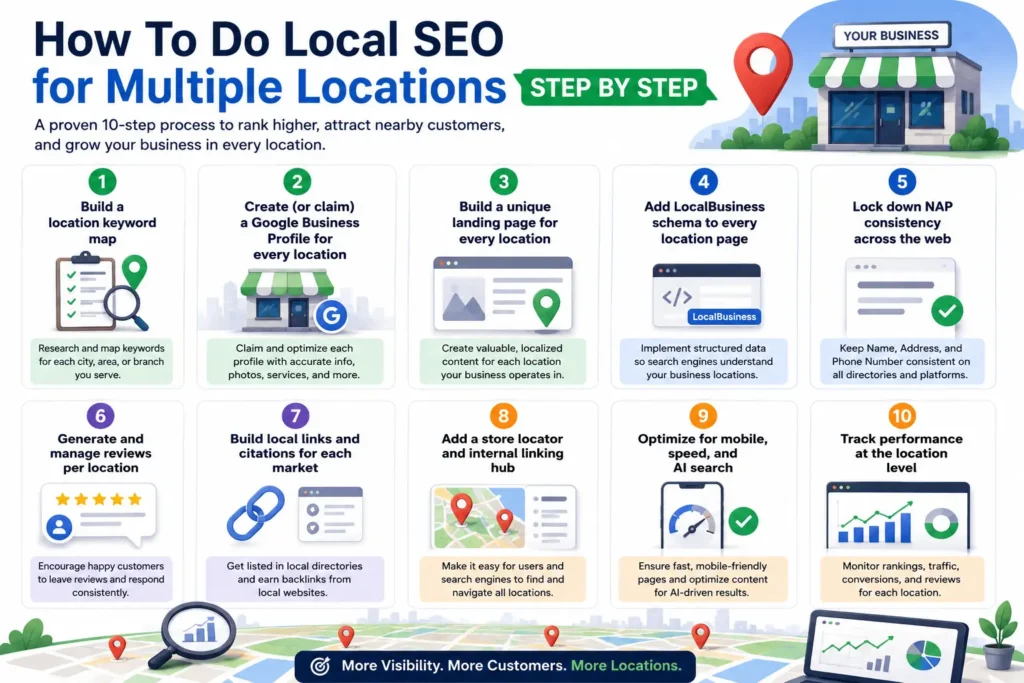
How To Do Local SEO for Multiple Locations: Step by Step
This is the core system. Work through it in order. Each step is repeatable across 3 locations or 300.
Step 1 — Build a location keyword map
Start with a spreadsheet, one row per location. For each, capture the core service + city combinations people actually search. Multiply your primary services by your locations.
[service] + [city]        →  "emergency dentist in Austin"
[service] + near me       →  "dental implants near me"
[city] + [service] + [mod] →  "Austin dentist open Saturday"
[neighborhood] + [service] →  "Round Rock family dentist"
Include commercial-intent modifiers (near me, open now, best, cost, book) and neighborhood names around each branch. This map becomes the blueprint for your Google Business Profiles and location pages. Our free SEO tools can help you size the opportunity per market.
Step 2 — Create (or claim) a Google Business Profile for every location
This is the single highest-impact step. Each location gets its own verified profile.
- Claim or create a profile for each real, staffed address at business.google.com.
- Verify every location. For brands with 10+ locations, use Google’s bulk verification (a spreadsheet upload) instead of verifying one by one.
- Use one location group / business account to manage all profiles centrally with user permissions.
- Fill every field completely: exact NAP, primary category (one, matching core service), relevant secondary categories, hours, services, attributes, and 10+ real photos per location.
- Keep the business name clean — your real brand name only, no keyword stuffing.
✓ Do: one profile per real location, identical NAP everywhere, unique local photos, a single accurate primary category.
✗ Don’t: share one profile across branches, use virtual offices, stuff keywords into names, or set overlapping service areas that cannibalize each other.
Step 3 — Build a unique landing page for every location
Each location needs its own indexable page with a clean, predictable URL. Use a consistent, crawlable structure:
https://www.yourbrand.com/locations/austin
https://www.yourbrand.com/locations/dallas
https://www.yourbrand.com/locations/houston

# or service + city for service businesses:
https://www.yourbrand.com/dental-implants/austin
The critical rule: every location page must be genuinely unique. Do not template the body text and swap the city. For a real example of a single-market page done properly, see our medical spa SEO page for Los Angeles — local intent, local proof, local CTA.
Location landing page checklist
- Unique H1: “[Service] in [City] | [Brand]”
- The exact NAP for that location (matching the profile character-for-character)
- An embedded Google Map for that specific address
- Location-specific intro: neighborhoods served, parking, directions, landmarks
- The staff, photos, hours, and services for that branch (not stock content)
- Location-specific reviews or testimonials
- Internal links to nearby locations and to relevant service pages
- A clear local CTA — call this branch, book here, get directions
- LocalBusiness schema for that address (see Step 4)
Step 4 — Add LocalBusiness schema to every location page
Structured data tells Google — and AI search engines — exactly what and where each location is, instead of making them guess. Add a JSON-LD block to each location page with that location’s real details. Here is a valid, copy-ready template (swap in each location’s data):
<script type="application/ld+json">
{
  "@context": "https://schema.org",
  "@type": "Dentist",
  "@id": "https://www.yourbrand.com/locations/austin#business",
  "name": "Your Brand — Austin",
  "url": "https://www.yourbrand.com/locations/austin",
  "telephone": "+1-512-555-0134",
  "image": "https://www.yourbrand.com/img/austin-office.jpg",
  "priceRange": "$$",
  "address": {
    "@type": "PostalAddress",
    "streetAddress": "1200 South Congress Ave, Suite 200",
    "addressLocality": "Austin",
    "addressRegion": "TX",
    "postalCode": "78704",
    "addressCountry": "US"
  },
  "geo": {
    "@type": "GeoCoordinates",
    "latitude": 30.2500,
    "longitude": -97.7500
  },
  "openingHoursSpecification": [{
    "@type": "OpeningHoursSpecification",
    "dayOfWeek": ["Monday","Tuesday","Wednesday","Thursday","Friday"],
    "opens": "08:00", "closes": "17:00"
  }],
  "sameAs": [
    "https://www.google.com/maps/place/?q=place_id:YOUR_PLACE_ID",
    "https://www.facebook.com/yourbrand.austin"
  ]
}
</script>
Validate before you ship. Change @type to match your business (Restaurant, Physician, HVACBusiness, Store, etc.). Keep the schema NAP identical to the page and the Google profile. Test every page with Google’s Rich Results Test and Schema Markup Validator before publishing.
Step 5 — Lock down NAP consistency across the web
Every location’s Name, Address, and Phone must match — exactly — everywhere it appears. One version, used everywhere.
- Define the canonical NAP for each location in your master spreadsheet.
- Audit existing citations (Yelp, Bing Places, Apple Maps, Facebook, industry directories) for mismatches.
- Fix or claim listings so every directory shows the same NAP as the Google profile and the website page.
- Use a local citation manager to push and monitor listings at scale for many locations.
Consistent NAP directly strengthens the distance signal and prevents Google from splitting trust across conflicting records. Pick one format per location and never deviate.
Step 6 — Generate and manage reviews per location
Reviews are roughly a fifth of local pack ranking power — and they work per location, not per brand. A location with 120 recent, answered reviews will out-rank a sibling branch with 6.
- Create a unique review link for each Google profile and route each branch’s customers to their own link.
- Ask consistently at the moment of a happy experience — QR codes, follow-up SMS/email, receipts.
- Respond to every review, positive and negative, per location. Response activity is itself an engagement signal.
- Never buy or gate reviews. Fake reviews risk suspension and destroy trust.
Step 7 — Build local links and citations for each market
Prominence grows when your locations earn mentions in their own communities. Beyond national brand links, pursue local signals per market:
- Local chambers of commerce, business associations, and city directories
- Local sponsorships, events, and charity partnerships (each produces a local link)
- Local press and “best of [city]” roundups
- Industry-specific and geo-specific directories relevant to that location
Step 8 — Add a store locator and internal linking hub
A crawlable store/location finder ties the whole system together. It gives Google a clean path to every location page and helps users find their nearest branch.
- Build an HTML store locator that links (in crawlable text, not just a map widget) to every location page.
- Link the hub from your main navigation so it’s one click from the homepage.
- Cross-link nearby locations to each other to spread authority and capture neighboring searches.
Step 9 — Optimize for mobile, speed, and AI search
Around 70% of local searches happen on mobile, and slow pages lose conversions. On top of that, AI Overviews and AI assistants increasingly answer local queries by reading structured, well-organized location data.
- Pass Core Web Vitals on every location page; keep load under ~3 seconds.
- Make click-to-call and directions obvious and tappable on mobile.
- Keep NAP + schema clean so AI engines can cite your locations confidently.
Step 10 — Track performance at the location level
You can’t scale what you can’t see. Report per location, not just brand-wide, so you know which branches win and which need work.
- Google Business Profile Insights per location (calls, direction requests, searches)
- Local pack + local organic rank tracking with a geo-grid tool (rankings vary by point on the map)
- Reviews velocity and average rating per location
- Location-page traffic, conversions, and “near me” query share in Search Console
Running this across 10, 50, or 300 locations?
Doing all ten steps consistently at scale is an operations problem. We build and run the system for you — profiles, pages, citations, reviews and location-level reporting.
Talk to our multi-location SEO team see transparent pricing on our SEO rate card
A Worked Example: 3-Location Dental Group
To make this concrete, here’s an illustrative example (not a client) of how the system fits together for a fictional dental group with three offices: Austin, Round Rock, and Cedar Park. For a live example of a dental location page, see our SEO for dentists in Mountain Brook page.
| Location | Google Business Profile | Landing page |
|---|---|---|
| Austin | Own profile · primary category “Dentist” · 40+ local photos · own review link | /locations/austin · unique H1, embedded map, Austin staff + neighborhoods, Dentist schema |
| Round Rock | Own profile · exact NAP · Saturday hours accurate · answers all reviews | /locations/round-rock · Round Rock reviews, parking + directions, internal link to Austin |
| Cedar Park | Own profile · secondary categories for implants/ortho · weekly photo updates | /locations/cedar-park · Cedar Park content, local sponsorship link, click-to-call CTA |
Each office is treated as its own local business: its own profile, its own page, its own reviews, its own local links. A store locator at /locations links to all three and cross-links neighbors. The brand shares one identity — but every location earns its own ranking. That is the entire model, whether you have 3 offices or 300.
Tools, Metrics & SEO Factors That Matter
The metrics to watch (per location)
| Metric | Where to find it | Why it matters |
|---|---|---|
| Local pack ranking | Geo-grid rank tracker | Shows real visibility across the map, not one point |
| Review count + rating | Google Business Profile | Prominence signal; drives clicks and trust |
| Direction requests / calls | Profile Insights | Direct proxy for local demand and intent |
| Location page traffic | GA4 / Search Console | Confirms your pages are indexed and ranking |
| NAP consistency score | Citation audit tool | Predicts distance-signal strength |
| Core Web Vitals | PageSpeed Insights / Search Console | Mobile conversion + ranking factor |
Tool categories worth having
- Profile management: Google Business Profile Manager (with location groups + bulk verification for chains).
- Citation / listing management: tools that push and monitor NAP across directories at scale.
- Geo-grid rank tracking: tools that map rankings across a city, not a single spot.
- Review generation + monitoring: per-location review links, requests, and response workflows.
- Technical + schema: Rich Results Test, Schema Validator, Search Console, PageSpeed Insights.
You can start free with our SEO tools hub.
Why Hire an Expert Instead of Going DIY
You can run this system yourself — the framework above is complete. But at scale, multi-location local SEO becomes an operations problem as much as a marketing one, and the cost of small errors multiplies across every location.
- Suspension risk multiplies. One guideline mistake replicated across 50 profiles can trigger account-wide suspensions. Experience prevents that.
- Duplicate-content traps scale. Writing genuinely unique pages for dozens of locations is hard to do well without a process.
- Consistency at scale is a system, not a task. Keeping NAP, schema, hours, and reviews clean across hundreds of records needs tooling and workflow.
- Speed to results. An expert team compresses months of trial-and-error into a proven rollout.
Not sure whether your current provider is doing the work? Read how to tell if your SEO agency is actually delivering. And if you’re an agency yourself, we also run this as a white label SEO service under your brand.
Why Choose SEO Circular for Multi-Location Local SEO
SEO Circular is a full-service, enterprise-grade SEO agency that helps businesses rank higher, attract the right audience, and turn local searches into real customers. We specialize in scaling local search across many locations — from regional multi-branch businesses to national brands — without sacrificing the consistency that keeps profiles healthy and rankings strong.
- Built for scale. We manage local SEO for complex, multi-location businesses with the systems and reporting to match.
- Ranking → Leads → Sales. We optimize for outcomes that matter: qualified local leads and measurable revenue, location by location.
- Verifiable, ethical work only. No fake reviews, no keyword-stuffed profiles, no shortcuts that put your listings at risk.
- Clear, location-level reporting. You see exactly which branches are winning and where we’re driving growth next.
See the approach applied in practice on our local pages for New York, Wilmington NC, and London — or read how local SEO grows home improvement businesses.
Frequently Asked Questions
How do I rank multiple business locations on Google?
Give each location its own verified Google Business Profile, a unique location landing page with local schema, consistent NAP across the web, and its own stream of reviews. Google ranks each location largely independently, so every branch needs its own optimized signals of relevance, distance, and prominence.
Do I need a separate page for each location?
Yes. Each location should have its own indexable URL (for example /locations/austin) with unique, location-specific content — real NAP, an embedded map, local details, staff, and reviews. Templated pages that only swap the city name get filtered by Google and won’t rank.
Can I use one Google Business Profile for multiple locations?
No. Every real, staffed location needs its own verified profile. For brands with 10 or more locations, Google offers bulk verification so you can verify many profiles at once and manage them from a single location group.
What is NAP consistency and why does it matter?
NAP stands for Name, Address, and Phone. Every mention of a location across your site, Google profile, and directories must match exactly. Inconsistent NAP confuses Google, weakens the distance signal, and can split the trust between duplicate records.
How important are reviews for multi-location SEO?
Very. Reviews make up roughly 20% of local pack ranking influence and they count per location, not per brand. Each branch should collect and respond to its own reviews using its own review link.
How long does multi-location local SEO take to work?
Foundational wins (profile optimization, fixing NAP) can show within weeks. Competitive local pack rankings and review-driven prominence typically build over 3 to 6 months, and compound from there as each location matures.
Ready to rank every location?
SEO Circular helps multi-location brands dominate local search — profile by profile, page by page, city by city. If you want every branch pulling its weight, let’s build the system together. We’ll show you exactly where your locations are winning and where you’re leaving revenue on the table.
Book your free multi-location SEO audit or explore our SEO cost calculator